AR aging
Where: Sales → AR aging
Sales → AR aging is your receivables cockpit: “Open (issued + overdue) invoices bucketed by days past due.” A meter across the top splits your total “Open receivables” into buckets — Current / 1–30 / 31–60 / 61–90 / 90+ — and the table lists each invoice with Customer, Status, Amount due, Days overdue, and its Bucket.
Every figure on this page is the balance still owed, not the invoice's face value. Take a 100,000 invoice with 40,000 already received: the row reads 40,000 of 100,000 and the buckets, the headline and the reminder that goes to the customer all count 60,000.
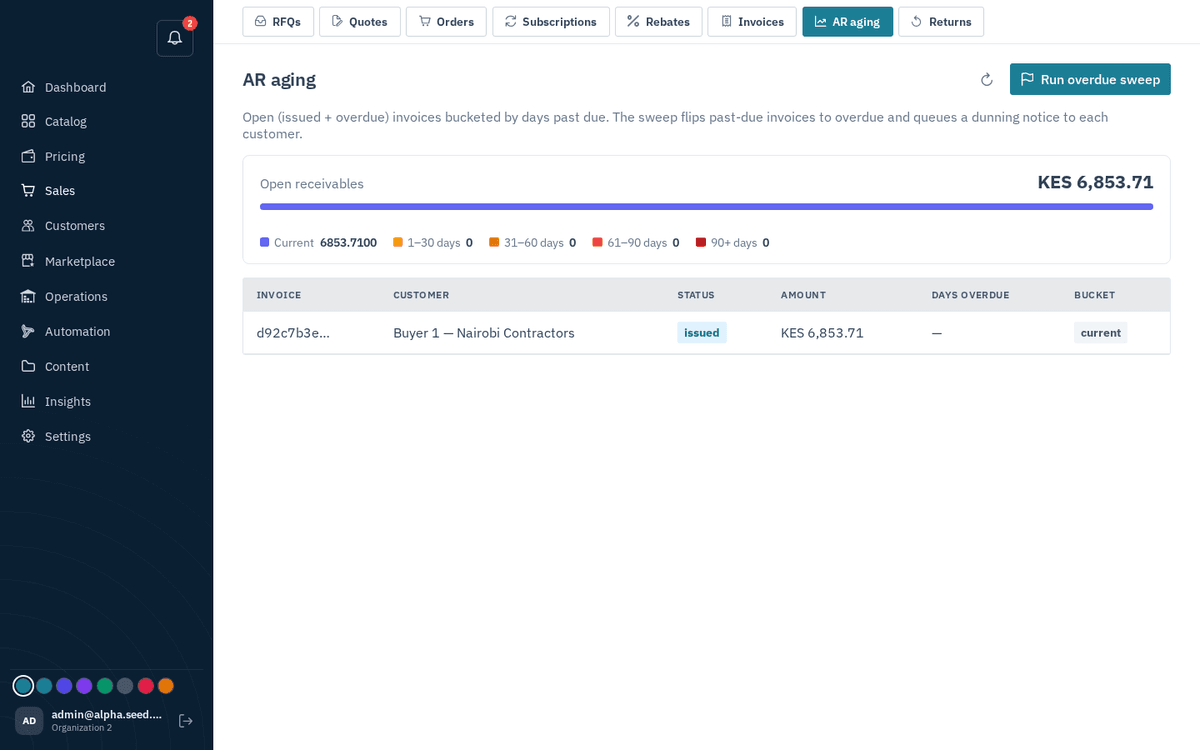
Sales → AR aging — open receivables bucketed by days overdue, with the dunning sweep
Press “Run overdue sweep” to flip every past-due invoice to overdue and queue chase emails in one go — the toast reports “Marked N overdue — Dunning notices queued”.
You rarely need the button — the “Mark invoices overdue + dun” automation (Automation) runs this sweep for you on schedule. The button is there for an on-demand pass before, say, a month-end review.
When nothing is outstanding the page celebrates: “No open invoices — Nothing is outstanding… Nice.”
Finding one balance
The table pages through the book 25 rows at a time rather than drawing it all at once, and three controls narrow it:
- Search by invoice number or customer name — “Adscope”, “STATEMENT-LDR100682”.
- Click a bucket in the meter to see only those invoices. The bucket totals stay computed over everything your search left, so drilling into 90+ never redraws the picture above it; click it again to come back out.
- The two dropdowns filter by status (overdue or issued) and by chase state — never reminded, promised to pay, chased, no promise, or not chased.
Active filters show as chips in the search box; the × on a chip clears it. The headline total follows your search, so searching one customer gives you their aging at a glance.
Reminders that run themselves
Switch on Remind customers about unpaid invoices under Automation. Every hour it looks at each open invoice and sends the reminder for the stage it has reached — by default 3 days before the due date, on the day, then 7, 14 and 30 days after, and every 14 days from there until it is paid. Each stage reaches each contact once per channel, only between 08:00 and 18:00 in your timezone. Days, channels, hours and the text itself are the automation's parameters.
Reminders go to the customer's billing contacts — the accountants you flag on Customers → ‹customer› → Contacts. A customer with no billing contact falls back to its primary portal user and main phone.
- Email always works.
- SMS needs your Sozuri project in Settings → SMS.
- WhatsApp needs the setup in Settings → WhatsApp.
The table shows Last reminder per invoice, and Reminders sent underneath lists every send with its channel, recipient, stage and status, newest first, paged and searchable by customer, invoice or recipient. Remind now on a row sends immediately on every configured channel.
Adding one balance by hand
Add a balance, above the table on the left, is for a single invoice raised outside Sokisoko — no spreadsheet needed. Give the customer, invoice number, amount and due date; a past date lands as overdue. The accountant's phone and email are optional but they are who reminders reach, so filling them in is what makes the balance chaseable. A customer or accountant that does not exist yet is created, and entering the same customer and invoice number again updates that balance rather than adding a second one.
Bringing in your aging statement
Most ledgers export receivables as an aging statement: one row per customer with the balance split into 0–30, 31–60, 61–90, 91–120 and 121+ days, a Balance due and Comments. Press Import unpaid invoices, pick Aging statement (balances by customer) and upload that sheet as it is — the headers are recognised, and Customer code is stored on the account so later statements match by code. Each debtor becomes one open statement balance, treated as overdue by its oldest bucket, and the bucket breakdown and comments travel with it so reminders can quote them.
The sheet's free text is read too. A Comments value such as don't follow up, company is closed, VAT withholding amounts, payment received or anything about a dispute, remittance or write-off switches reminders off for that balance (the row shows not chased); follow up, gentle follow up or a blank keeps them on. In Remarks, a phone number becomes the customer's billing contact and a day such as after 10th or on the 9th becomes a promise to pay. All-caps ledger names are stored in readable case.
Upload the next statement and the system reconciles: a customer whose balance dropped is updated, a customer at zero or missing from the statement is marked paid, and reminders for them stop.
How reminders stop
Reminders only ever go to invoices that are open with a balance, so anything that settles an invoice silences it:
- Record the payment — Payments, the invoice page, or “Mwangi paid 12,500 by M-Pesa” in chat. Once the balance reaches zero the invoice is paid.
- M-Pesa and card payments confirmed by the gateway settle the invoice automatically.
- Re-import the statement — anyone paid up disappears from it and is closed.
Pacing, so a sweep cannot get your number banned
A WhatsApp number that sends a burst is the fastest way to have it blocked, and gateways cap throughput per minute. Each sweep is therefore paced per channel: by default at most 40 WhatsApp messages per run, spaced 1.5 seconds apart, which keeps a run under the usual 60-a-minute limit. Anything over the cap is not skipped, it waits for the next hourly run, so a large ledger drains over a few hours instead of in one burst. The cap, the spacing and an optional SMS cap are parameters on the automation rule.
When the customer says they have paid
Every reminder ends with “Already paid? Reply with the M-Pesa code, cheque or bank reference, or record it here” and a link. That link opens a public I've paid page for that one invoice, no login needed, where the accountant picks how it was paid, enters the reference and, optionally, the amount and their contact. On WhatsApp the same works by simply replying with the M-Pesa code or “paid by cheque 004512”; the assistant thanks them and stays quiet. SMS is one-way, so the text carries the link instead.
Each report becomes a reported payment to verify on this page and a notification for the team. Nothing is deducted from the balance by the report itself — a customer saying they paid is a claim, not a payment, and the invoice keeps its amount and its place in the aging buckets until someone here approves it.
Accept is that approval. It asks what was actually received, filled in with the customer's own figure or, when they gave none, the whole outstanding balance. Confirm the full amount and the invoice is settled and the reminders stop; enter less and the invoice is reduced by that amount and stays open, so a part payment keeps being chased for the rest. Reject books nothing and keeps the invoice as it was. In chat: “any payment claims waiting?”, then “accept QWE1A2B3C4” behind one confirmation.
Both decisions take an internal note — what you checked, which bank statement, why the figure differs from what the customer said. It is never shown to the customer. Switch the list from To verify to Accepted or Rejected to see the decisions already made, each with the name of whoever made it, the time, the amount actually booked and that note, so an auditor can follow a payment from the customer's message to the entry in the books. To verify lists the longest-waiting claim first, so none sits behind newer ones; decided claims show the latest decision first. Every list pages and can be searched by customer, payment code or invoice.
When the customer names a day
A customer who says “we'll pay on Friday” has answered; chasing them daily after that only breeds mistrust. A promise to pay pauses the invoice's reminders until the named day. It can come from three places: the customer picks We will pay on a date on the I've paid page; a WhatsApp reply such as “will settle by the 15th” or “paying next week” is understood and acknowledged; or the sales team records it after a call with Promise on the invoice row, or in chat: “Mwangi says they'll pay on 2026-09-15”. The team is notified, the row shows pays ‹date›, and the promise history stays on the invoice.
If the day passes unpaid, one follow-up goes out that refers to the promise (“which you kindly promised to settle by Fri 11 Sep”), and the cadence resumes from there. Promises are capped at 90 days out.
A channel that is switched on but not finished (WhatsApp with no API key, say) is reported back as skipped with the reason, so a half-configured wire never fails quietly. If no channel can send, the reminder is refused and tells you which setting to finish.
Phone numbers are dialled in international form, using the country code from Settings → SMS: a contact saved as 0722 800500 goes out as 254722800500. This matters most on WhatsApp, which cannot look up a local number at all — it used to sit there until the gateway gave up, and the row showed a timeout. A number that still is not usable is refused straight away with the reason, instead of a minute of silence.
Balances that must not be chased
Stop on an invoice row switches its reminders off without touching the balance: disputes, withholding-tax residues, a closed company, money already received but not yet allocated. Resume turns them back on. The aging import sets this from the Comments column, so a statement that says don't follow up is respected from the first upload.
Mark paid on an invoice row is the sales team's shortcut when money arrived without a report: pick how it was paid, add the reference, and the balance is booked and the invoice closed in one step.
Drafting the wording with AI
Ask the assistant “draft a firm reminder for Mwangi Hardware” (or friendly, final notice, with anything it should mention). It writes a short message from the invoice's facts only — balance, due date, statement buckets, how many reminders went before — shows it to you, and sends it on every configured channel once you press Confirm. To change the standing wording the automation uses, edit the rule's Overdue text and Upcoming text parameters; tokens like {name}, {invoice}, {amount} and {due_date} are filled per customer.
Invoices raised elsewhere
If invoices live in another system, press Import unpaid invoices. The file carries the customer, the invoice number, the amount, the due date and the accountant's name, phone and email; the import creates the customer if needed, records the invoice (past-due ones arrive as overdue), and flags the accountant as the billing contact. Re-importing the same customer and invoice number updates the amount and due date rather than duplicating. See Importing data in bulk.
Ask the assistant “who has been reminded about payments” for the same log in chat.