Cost-center budgets
Where: ⋯ → Budgets
Open ⋯ → Budgets (“Spending budgets — Your cost-center spend limits for the current period. Orders that would exceed a budget are blocked at checkout.”).
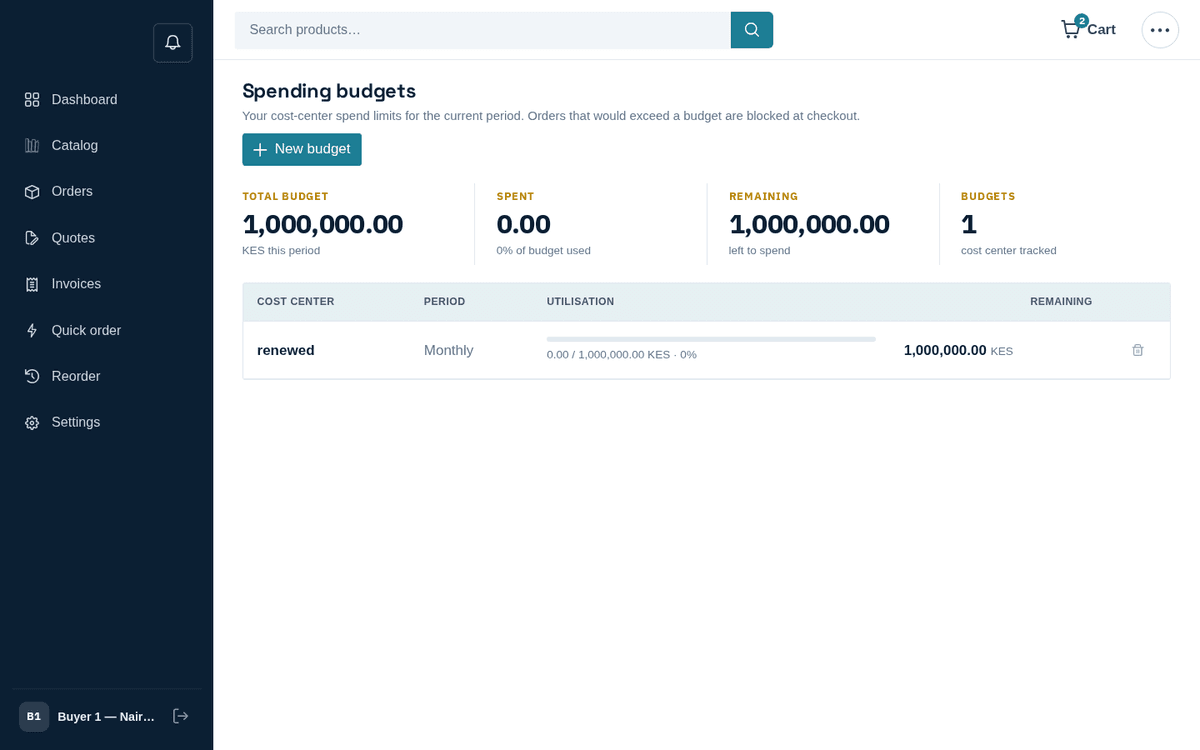
Cost-center budgets with live utilisation
The stat band totals your Total budget, Spent (“‹p›% of budget used”), Remaining and the number of Budgets. The table shows each budget’s Cost center (“Company-wide” when blank), Period, a utilisation bar — “‹spent› / ‹amount› · ‹p›%”, turning amber at 80% and red at 100% — and the Remaining amount.
Company admins can create budgets with New budget: pick a Cost center (“Leave blank for company-wide”), a Period (Monthly / Quarterly / Annual) and an Amount. As the dialog notes: “The budget meters order totals in your store currency. Orders that would push spend past the cap are held at checkout.” Admins can also delete budgets (trash icon).
What happens at checkout when a budget blocks: when you press Place order on an order that would push the relevant cost center (or the company-wide budget) past its cap, the order is refused and the checkout shows the block message. Your options:
- Reduce the order or split it across periods.
- Charge a different Cost center in step 1 (if legitimate).
- Ask your company admin to raise the budget.
- Wait for the next period, when the meter resets.
The dashboard alert “N budget(s) are above 80% spent” gives you early warning before you hit the wall.
If you’re not an admin and no budgets exist, the page says: “Your company admin hasn’t set spending limits. Orders won’t be blocked at checkout.”