The cart
Where: The cart icon, or the Cart chip in the top bar
Click the cart icon (its badge counts your distinct line items) or the Cart chip in the top bar.
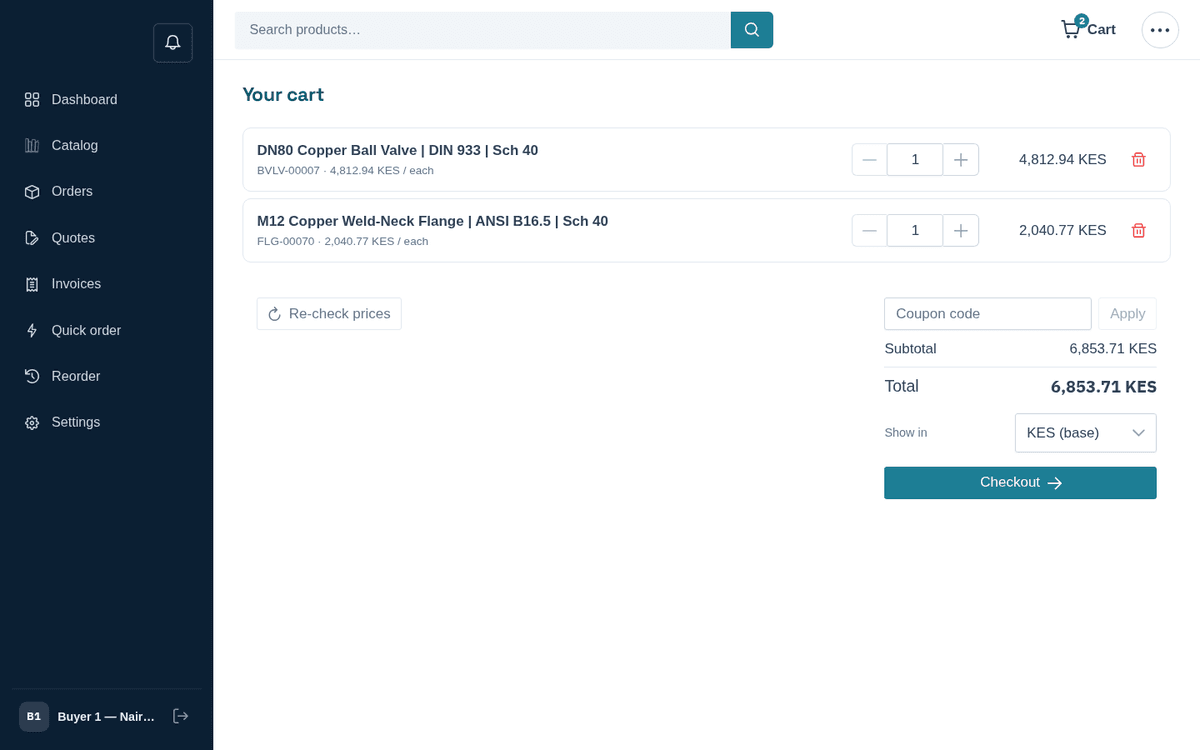
The cart: line items, quantity steppers, coupon box and totals
Each line shows the product name, “SKU · unit price / unit”, a quantity stepper, the row total, and a trash icon to remove it. On the right: Subtotal, any Discount, and the Total.
Things worth knowing here:
- Re-check prices — prices in B2B move. This button re-resolves every line against current pricing and reports either “N price(s) updated to current pricing.” or “All prices are current.” Use it on carts you built days ago.
- Coupon code — type a code and press Apply. A valid coupon shows as a chip (“‹CODE› — ‹label›”) with an × to remove it. One that can’t be used says why: “We don’t recognise that code.”, “That code ended on ‹date›.”, “That code starts on ‹date›.” or “That code has been used up.”
- Quantity — type the number or use − and +; it saves a moment after you stop, up to 1,000,000 per line.
- Free-shipping meter — if the store offers free shipping above a threshold, a progress bar tells you “Add ‹amount› more for free shipping” and celebrates “You’ve unlocked free shipping!” when you cross it.
- Show in — a display-currency selector. Pick another currency to see an indicative “≈ ‹currency› ‹amount›” conversion under the total. You are still billed in the store’s currency; this is for reference only.
When you’re ready, press Checkout.
Priced on request? Items without a price for you still go into the cart, marked On request. While any are in the cart, its main button is Request a quote for these items. It opens the quote form with every item and quantity already filled in, so nothing is retyped: add your name and email (or just send it, if you're signed in) and press Submit request. Once the request is sent, the cart empties. Checkout opens only when every item has a price: to buy the priced items now, remove the on-request ones and press Checkout. If you try to check out with them anyway, checkout says “‹N› items are priced on request: request a quote for them, or remove them to check out the rest”.
If you filled a cart before signing in, pressing Checkout opens the “Ready to check out?” dialog: “Sign in to check out with your account pricing, or continue as a guest.” Sign in takes you to the sign-in page and then straight on to checkout. Continue as guest opens a short form with your name, email and, if you like, company and a phone for delivery updates. No password is needed. Anything to fix is said under its field; if the email already has an account here, the form offers Sign in instead. Press Continue to checkout and your cart comes with you.
If an add-to-cart fails, the message tells you why: “This product has options — open its page to configure it before adding.” (configurable product), or “Already in your cart as a configured item — edit or remove it from the cart.”