Report builder
Where: Insights → Report builder
Insights → Report builder builds custom reports without a spreadsheet export. The left panel holds Saved reports (“No saved reports yet — create one to begin.”); the right walks you through a wizard:
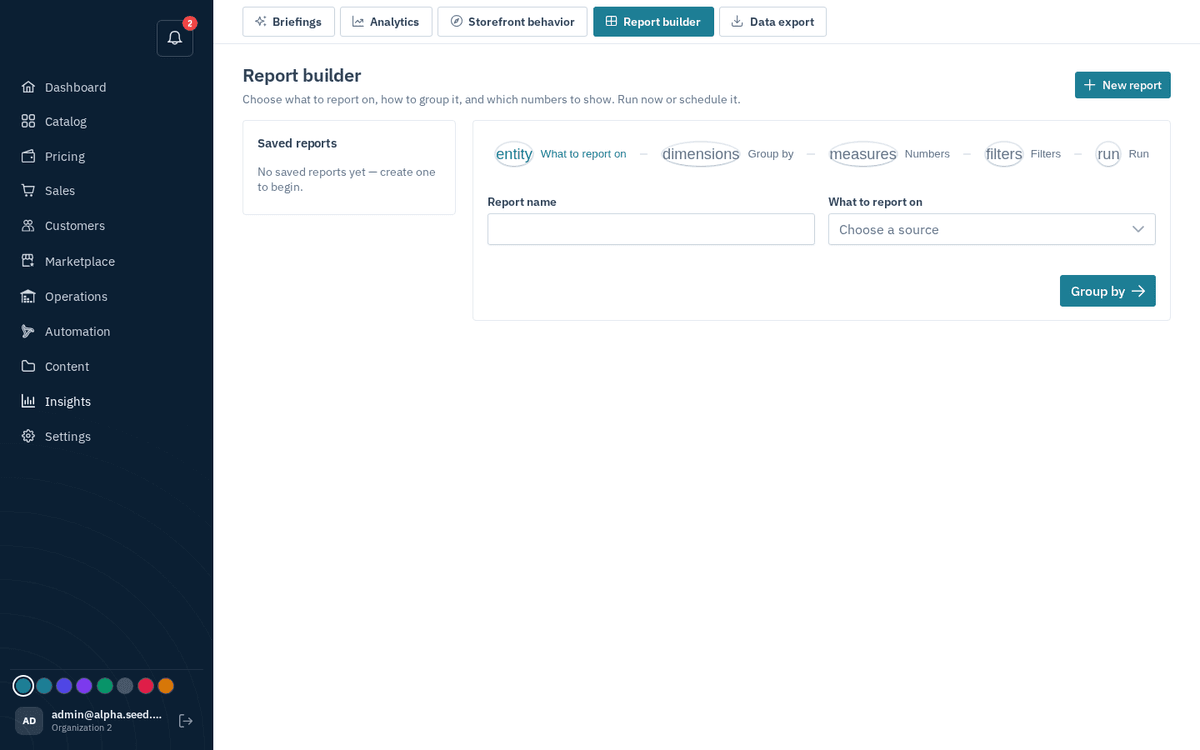
Insights → Report builder — entity → group → numbers → filters → run/schedule
- What to report on — name the report and pick the source. Ten are available: orders, quotes, RFQs, invoices, payments, shipments, customers, products, inventory and opportunities. A business that sells by quote reports on quotes and RFQs exactly as a cart-led one reports on orders.
- Group by — a dimension, or “Don’t group — show a single total”.
- Numbers — one or more measures: a field plus an aggregate (count “counts every record”, sum, average…).
- Filters — field / operator / value rows to narrow the data.
- Run — press Run to see the result (“Result · N rows”), Download CSV to take it away, and Save to keep the definition. Saved reports can also run on a schedule and email their CSV to you. A run returns up to 10,000 rows; when there are more, you get a warning and the CSV ends with a “Truncated…” line — add a filter or a coarser grouping to see everything.
Each source carries its own dimensions, measures and filters, so the choices you are offered are always ones that make sense for it: inventory groups by warehouse and SKU and measures quantity; payments group by method and measure amount; quotes group by status and measure the value quoted.