Catalog moderation
Where: Marketplace → Catalog moderation
Vendors list their own products, but nothing a vendor lists is visible or buyable until you approve it. Go to Marketplace → Catalog moderation: “Vendor-submitted listings awaiting approval. Approved products become visible and buyable on the storefront; rejected ones stay hidden.” View by vendor (kanban) or as a list; each card shows the image, SKU, and the vendor’s proposed price tiers (e.g. “100+ KES 4,000” — or “Price on request”).
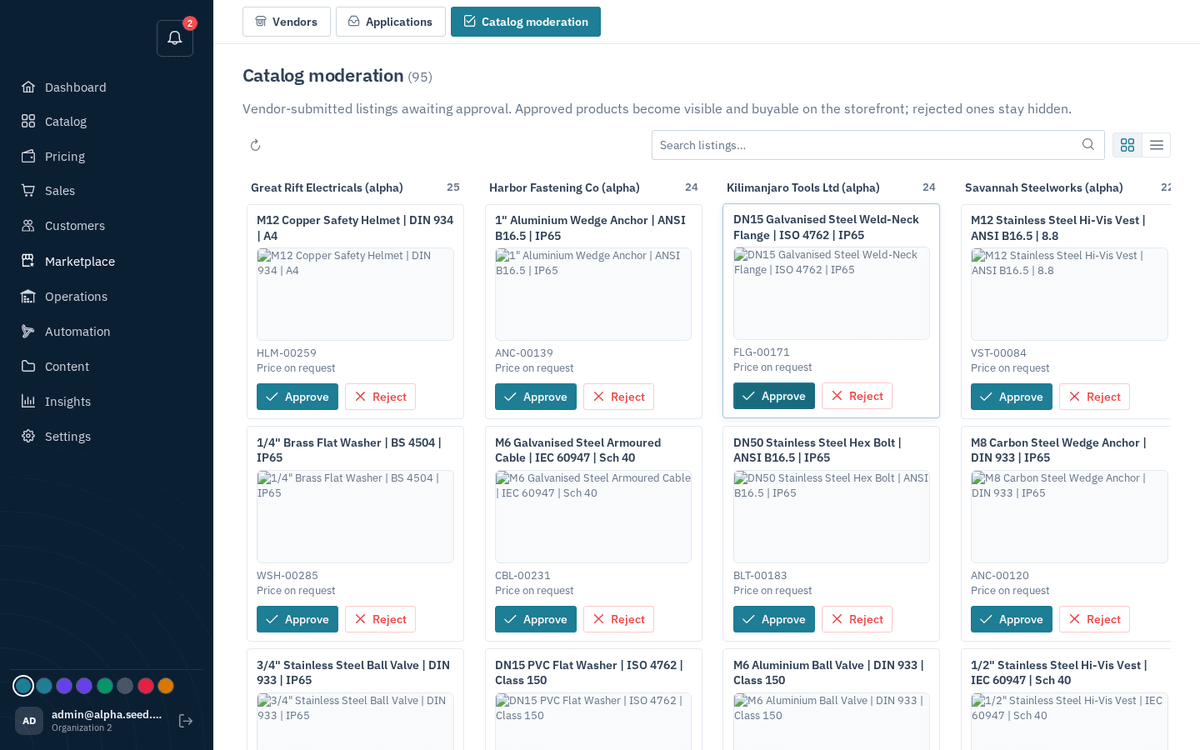
Marketplace → Catalog moderation — vendor listings wait here before going live
- Approve — toast “Product approved”. Approval also publishes the vendor’s proposed price tiers into your default price list, so the product is immediately sellable at those prices. The vendor is notified.
- Reject — the dialog explains: “Tell the vendor what to fix. They’ll see this reason and can revise and resubmit.” (placeholder: “e.g. Images are too low resolution; please upload at least 1000px.”). Press “Reject listing” — toast “Product rejected — The vendor will see your feedback.”
When the queue is empty: “All caught up — No vendor listings are waiting for moderation right now.” (The dashboard’s “Products awaiting moderation” row tells you when it isn’t.)